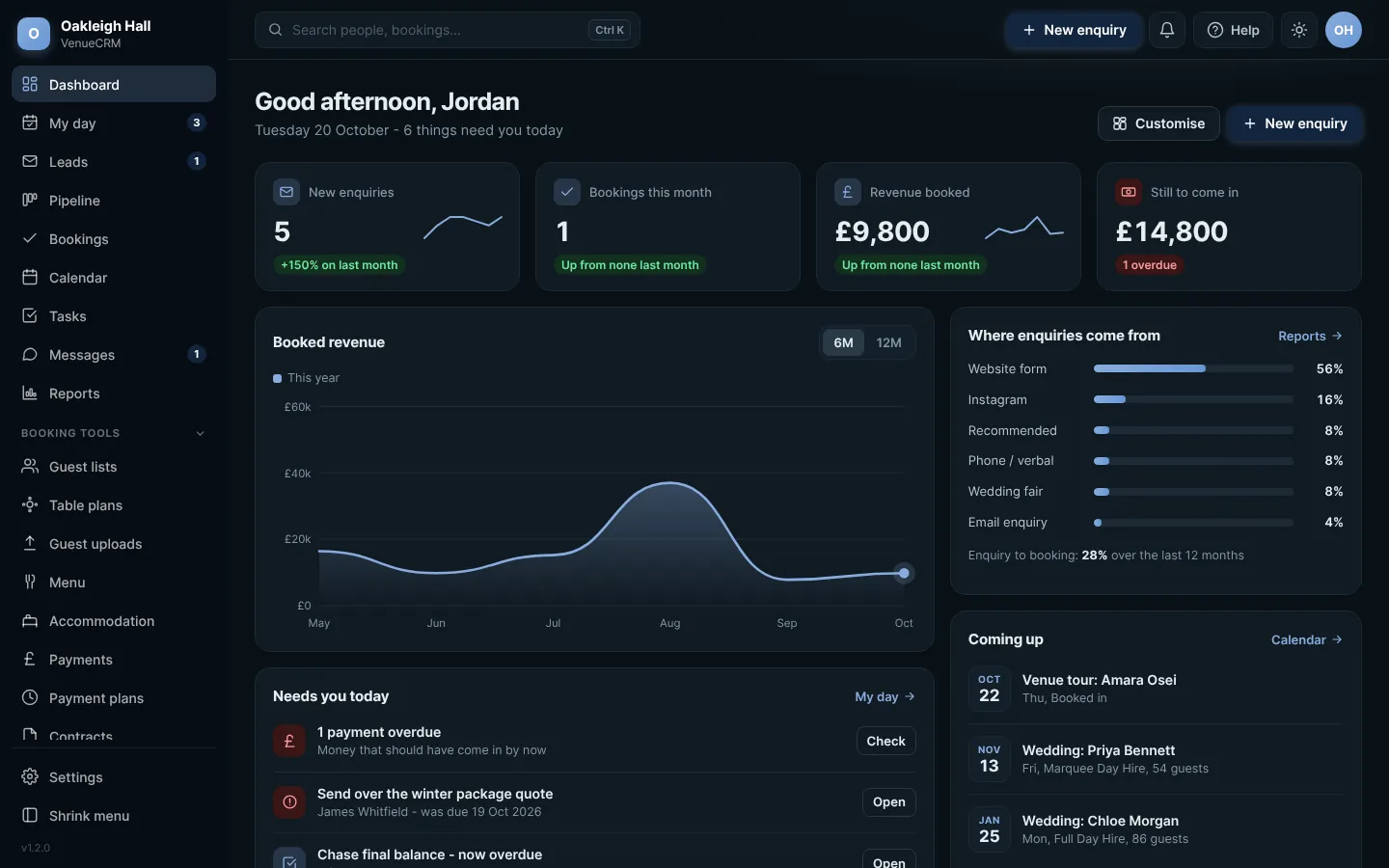
A portal they actually open
Countdown, signed contract, payments and a real message thread.
See the full listEnquiry through to a signed, seated, catered event - guest lists, RSVPs and a floor plan all tied to the booking, no per-login bill.
Here's a closer look at the ones venues tell us they notice first. Click through, or leave it running.
Why PixelCRMCountdown, signed contract, payments and a real message thread.
See the full listDrag-and-drop floor planning, with guests assigned straight onto the plan as RSVPs come in.
See pricingEvery enquiry tracked through to a booking, with follow-ups that get a due date instead of a hope.
See all featuresRSVPs and meal choices come straight from the guest, through their own link - nothing re-typed from a form.
Why PixelCRMEvery one of these is included as standard - no add-on tiers, no per-feature upsells. Each sits against the booking record itself, not scattered across separate tools.
See where enquiries drop off, and how fast they convert.
Included as standard - connect anything you use.
Contracts and supplier files, tracked against the booking.
Automatic backups, consent and retention done properly.
Add fields, reorder stages, keep what's filled in.
Every change across every booking, in one place.
Honeypot fields, timing checks and rate limiting on every public form - no third-party service required.
Take deposits and instalments without a separate tool bolted on the side.
Webhooks out to Zapier or Make, and from there to Slack, a spreadsheet, your accounting software - whatever you already run.
Once someone's booked, they get their own space - not a login they'll use once, but somewhere genuinely worth coming back to. A countdown to the day. Contract and terms viewable and downloadable as a signed PDF, no separate e-sign tool. A live payment schedule that stays current as instalments come in, matched automatically rather than reconciled by hand. And a direct line to your team - a real two-way message thread, with your side able to keep an internal note separate from what the couple actually sees.
It's the same portal that handles their RSVP links, floor plan visibility and marketing preferences too - one place for the couple, not five different logins across five different tools.
 Full size
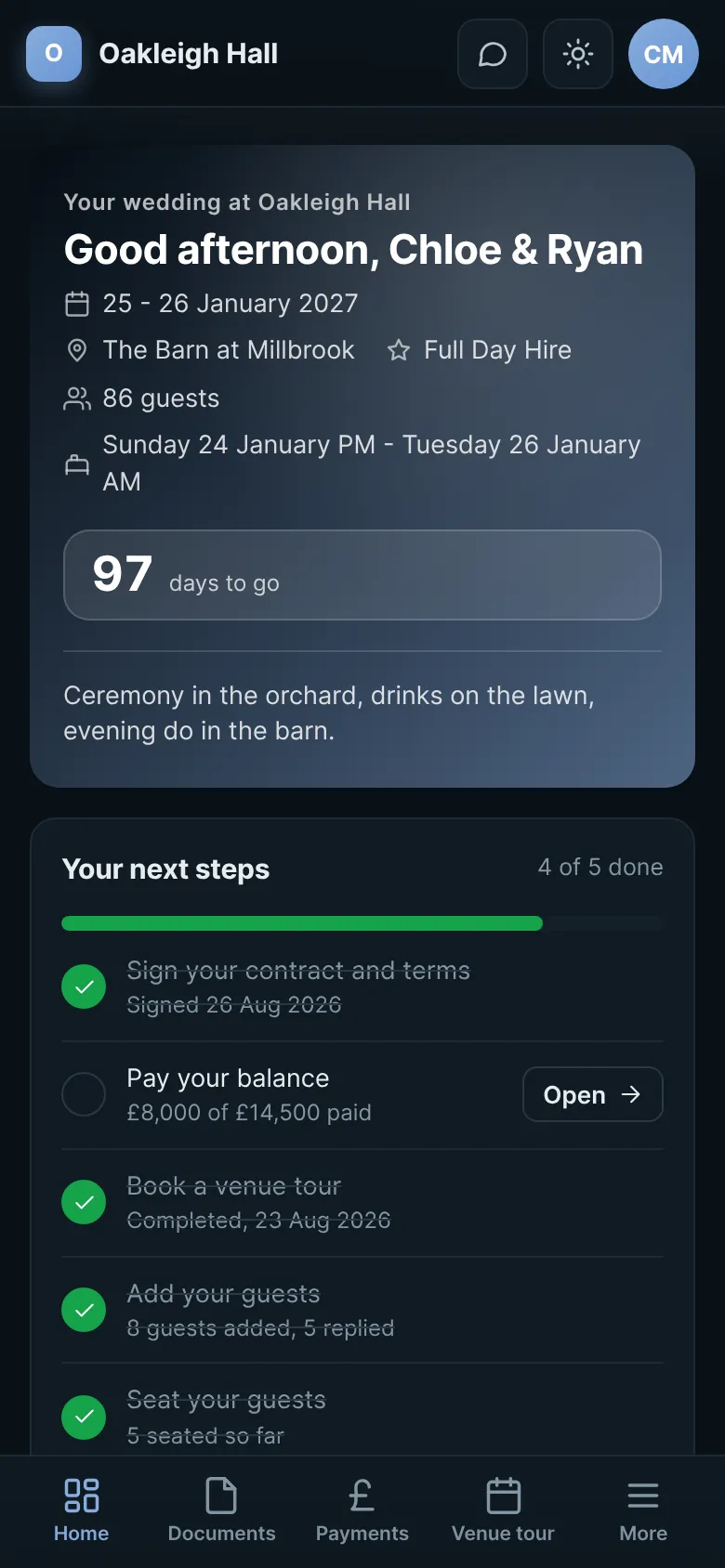
Pick a date and see exactly what's on - tours booked in, arrival times, who's staying over that night. The one view nobody else really needs, because nobody else runs a venue.
 Full size
Drop tables onto the plan, set seats, and assign guests by dragging them straight from the list. The layout is saved against the booking, not a printout that goes missing.
 Full size
Guests respond through their own link. Attendance, meal choice and dietary notes all sit against their name, ready to hand to the caterer.
 Full size
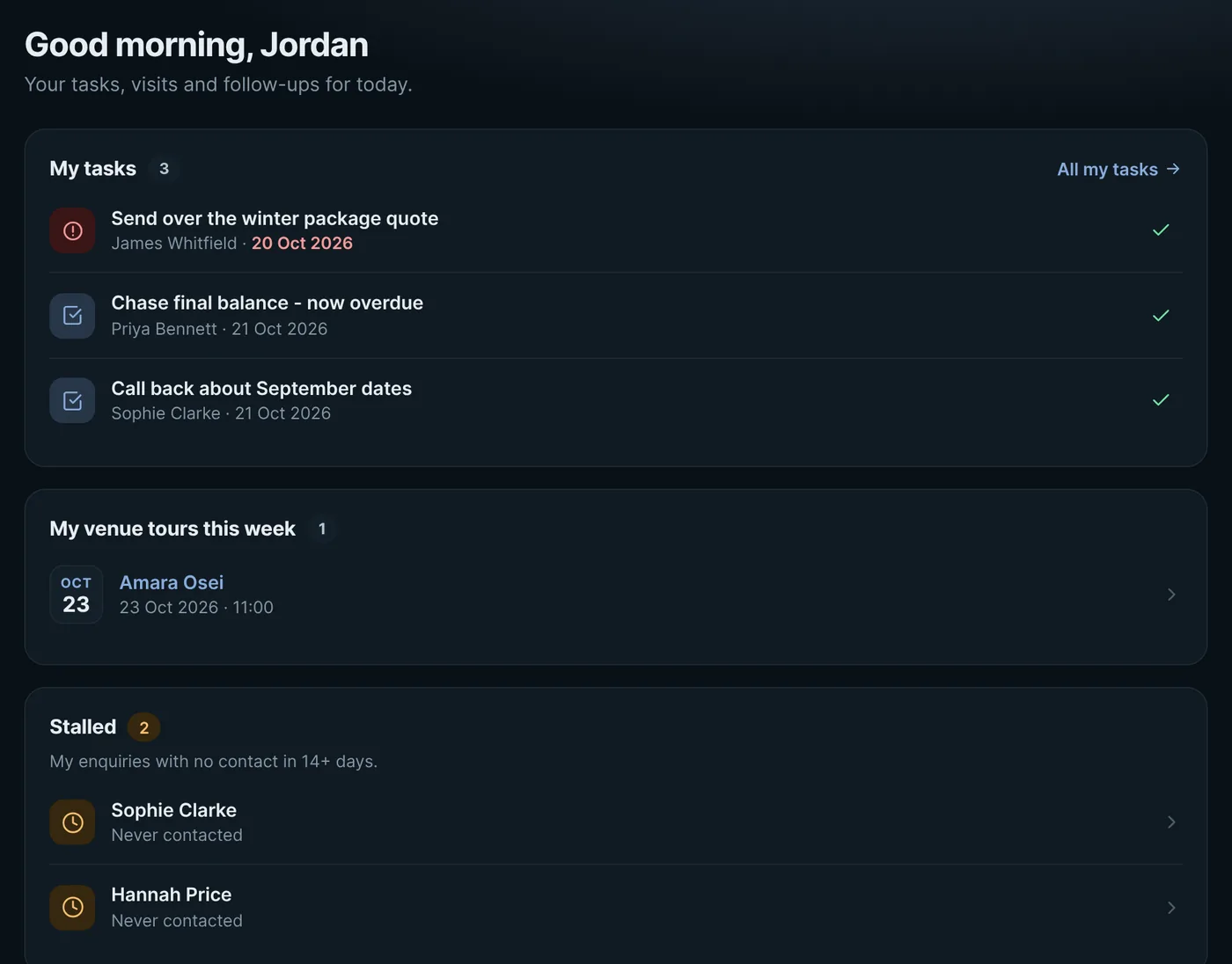
Enquiries get assigned to whoever's handling them, with a "my day" view of what's due - tasks, stalled enquiries, and today's tours - instead of everyone digging through one shared inbox.
 Full size
Not every CRM charges the same way. Here's the difference between PixelCRM and the typical subscription platform.
Enter what you're currently paying a month and we'll show you the gap - no setup fee, no minimum term and no per-seat creep.
Already on a lower rate than that? Worth a proper conversation rather than a rough calculator - what you're paying now may not include everything that comes as standard here. Get in touch and we'll be straight with you about whether switching makes sense.
Based on our from £125/month rate for Venue CRM, all in, with no setup fee.
More than just view their booking. A countdown to the day, their contract and terms viewable and downloadable as a signed PDF, a payment schedule that's always current as instalments come in, and a direct message thread with your team - plus managing their own guest RSVP links and seeing the floor plan as it's built. It's their one place for everything, not a login they use once and forget.
Guests can RSVP and choose meals through their own link. Staff can still add or edit entries directly if needed.
Captured the moment a guest RSVPs, sitting right against their name - ready to hand to the caterer without re-typing anything from a spreadsheet.
Yours to set up - add your actual dishes once, then choose what's on offer per wedding. Guests pick from a real menu at RSVP, not a blank text box.
Drag-and-drop. Tables and seats are arranged visually, and guests are assigned straight onto the plan.
Yes. Every enquiry, guest list and floor plan is tied to its own booking, so running several events in parallel doesn't cause any crossover.
Yes - a barn, a marquee, however many rooms or spaces you run, each one colour-coded and genuinely separate, not one calendar pretending to cover several.
Yes - rooms or units can be tracked against a booking for weddings where guests are staying over, so it's not a separate spreadsheet nobody remembers to update.
Yes. What's held and against which booking is visible at a glance, rather than something you have to dig out of a separate record.
There's a dedicated view for what's actually happening today - tours booked in, who's arriving, overnight stays - rather than a calendar you have to squint at to plan the morning around.
Both. Every booking's laid out month by month alongside the pipeline board, and there's a private calendar feed you can subscribe to from Google, Outlook or Apple Calendar, always current.
Yes. Enquiries can be assigned to whoever's handling them, and each person gets their own view of what's due today rather than everyone working from one shared inbox.
Yes, if you've switched it on - a tour request option can sit in the enquiry flow or the couple's own portal once they're a customer, and it picks up their venue category automatically if they've already booked. It's optional, so if you'd rather tours stayed a phone call, just leave it off.
Follow-ups get a task with a due date attached, and anything that's gone quiet gets flagged automatically - not left to memory.
It's flagged automatically the moment a likely repeat enquiry comes in, rather than two separate records for the same couple quietly drifting apart.
One search box covers every contact and booking, from anywhere in the system - no hunting through the pipeline for a name you half-remember.
Yes - add your own fields to a booking, and reorder or retire pipeline stages later without losing what's already filled in. It flexes to how you actually work, not the other way round.
Yes - a proper form builder, not fixed form types. Add whatever fields a tour, brochure or general enquiry needs, and two-way messaging takes over once someone's booked.
Possibly, by arrangement. Moving data across from another system isn't always possible, and depending on how much there is and what format it's in, there may be a charge. If you need it, let us know before you book and we'll check what can come across and confirm everything first.
Yes. An API and webhooks come as standard, not locked behind a premium tier - connect your website's enquiry form, or anything else that can send or receive a web request.
Yes - contracts and floor plans go from you, supplier documents and guest-submitted files come back the other way, each reviewed and tracked against the booking rather than left floating in an inbox.
Yes - your logo and your colour in place of ours, both in the portal the couple sees and anything generated from it. It's your venue, it should look like it.
Yes. Reporting shows where enquiries drop off in the pipeline and how long it's taking to turn one into a signed booking, not just a raw count of leads.
Yes, automatically. Data retention and consent are handled properly throughout too, not bolted on as an afterthought.
From £125 a month, all in - the licence, setup, updates and support. No setup fee, no per-login charges and no minimum term. If your setup is bigger or more complex, for example several sites, we quote a monthly price before anything starts - never an upfront fee. See pricing.
Yes - open Venue CRM in the playground and click around your own private copy, couple portal included, with no card and no call. Or book a demo and we'll set up a private preview just for you, open for a time that suits you.
Nothing, from their side. We don't punish couples for a billing issue on your end - if a licence lapses, admin access on your side goes read-only rather than being cut off, so nothing gets deleted and you can sort it out. We'll talk to you before anything changes for your couples.
Most of them are built to maximise recurring revenue for the platform, not value for the venue - per-login pricing that punishes you for growing, contracts that lock you in, and your guest data sat on servers you don't control. That's the gap we built PixelCRM to fill.
No problem. If you can't get into your hosting, or your host won't allow it (some WordPress-only hosting and website builders like Shopify don't), we can host your CRM on a subdomain on our system instead, by agreement. You'd need to be able to add one DNS record at your domain provider so it works on your own address. Not sure? Contact us before you book and we'll check it with you. It's still your data either way, and normal licensing rules apply the same regardless of who's hosting it.
Tell us about your venue and we'll show you Venue CRM properly.
Book a demo